What 'Practice Command' actually replaces in your clinic

The pricing page is the wrong document
When a clinic owner asks what Practice Command does, the honest answer is not "managed AI operations." That phrase tells you what we charge for, not what changes for the people in the building. So here is the operational version: what stops happening, what starts happening, and how that arc unfolds over the first ninety days.
One frame to begin with. We measure adoption by what the team stops doing, not by what the system starts doing. New systems that add work to a clinic do not last. Systems that remove work do. Everything below is described as a subtraction first.
Week 1: the morning ritual moves
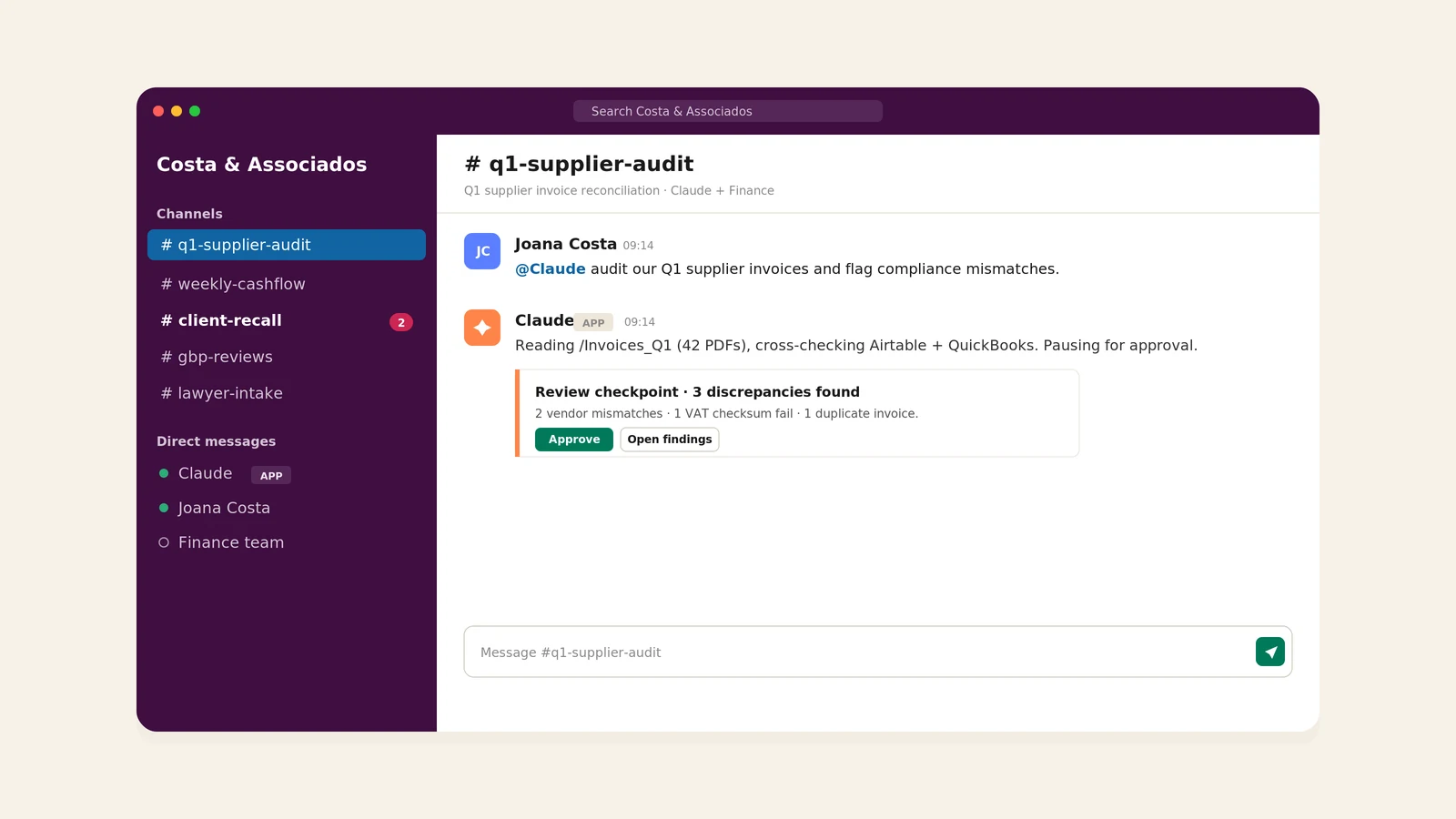
The most visible change in the first week is where the day starts. Before Practice Command, the receptionist opens her inbox, opens WhatsApp, opens the scheduling system, opens the patient management software, and spends the first hour reconstructing what happened overnight. After Practice Command, she opens one screen, Cowork, and sees a single prepared view of the day.
On that view: tomorrow's appointments, the reminder drafts already written in the right language, the deposit requests for cosmetic and orthodontic bookings, any rescheduling proposals from patients who replied overnight, and a short list of recall candidates. Each item is a draft. She reviews, edits anything that feels off, and approves the batch in about four minutes.
What that subtracts: the inbox triage, the reminder typing, the cross-checking between WhatsApp and the patient management software, the question of who replied yes and who replied no, the missed deposit requests that quietly slip out of the day.
What does not change in week 1: the system is conservative. The team is still checking everything. Trust is built one batch of approvals at a time.
Week 4: trust transfers, and the team stops checking
By the fourth week, the team has approved enough batches that the failure modes are known. Two or three categories of work move from "draft for review" to "running quietly in the background." Typically:
- Standard appointment reminders: sent without per-message review, with a daily digest the next morning.
- Deposit collection on routine bookings: Stripe Payment Links go out at booking time, no human in the middle.
- Cancellation rescheduling: patients who cancel get a same-channel proposal for an alternative slot, without the receptionist having to draft anything.
- Google Business Profile posts: twice-weekly cadence, drafted from clinic activity, approved on Friday mornings for the following week.
The morning ritual gets shorter. The four minutes become two. The recall list starts producing actual booked appointments rather than just being a list.
What that subtracts: the receptionist is no longer the bottleneck for routine reminder traffic. The owner is no longer the bottleneck for deposit collection. The system is starting to feel less like a tool and more like an extra pair of hands, one that does not ask for sick leave.
Week 12: the system has a seat at the table
By the third month, two things are true that were not true before. First, the admin layer of the clinic has shrunk by roughly 60–70 percent measured in hours. The receptionist is doing the work she actually wanted to do (greeting patients, supporting the doctors, running the front of house) instead of typing reminders and reconciling spreadsheets. Second, the owner is making decisions on information she did not have visibility into before: a weekly view of no-show patterns, a monthly view of recall yield, a quarterly view of which marketing channels actually produce booked appointments versus which produce noise.
The new questions in the room are not "did the reminders go out" or "did we collect the deposits." Those are running quietly. The questions are operational and strategic: which two weeks of the year should we run a recall campaign for the cosmetic patients we have not seen in eighteen months. Which patients are quietly worth more lifetime value than the booking pattern suggests. Which referral source is producing the no-shows.
The system is not making those decisions. It is surfacing the data and the options so the owner can.
What does not change, and never will
Practice Command does not make clinical decisions. It does not give patients medical advice. It does not interpret symptoms. It does not write treatment plans. It does not contact a patient about a clinical question without a doctor in the loop. Any inbound message that touches a medical question is escalated immediately, with full conversation context, to the relevant clinician.
The clinical work stays where it belongs. The non-clinical work, the eighty percent of a typical clinic day that is administrative, repetitive, and well-defined, moves into the system.
What it is not
It is not a chatbot bolted onto a website. It is not a replacement for the receptionist, the practice manager, or anyone else. It is not a magic wand that fixes a clinic with broken processes. If the clinic is over-booked, under-staffed, or fundamentally mis-priced, Practice Command will surface those problems faster. It will not solve them on its own.
What it is, accurately described: an integration and configuration layer that connects your existing tools (your scheduling software, your messaging channels, your payment processor, your records system) and runs the recurring administrative work through a supervised AI assistant that the owner directs and the team uses. The leverage comes from removing the friction between systems and removing the typing from the people. The judgment stays with the humans.
If you want to see what week 1 would look like for your clinic
The first conversation is a thirty-minute call, free, no pricing pitch. We map your current workflows on a whiteboard and tell you which of them Practice Command would replace, which it would augment, and which it would leave alone. That conversation is useful even if you decide not to engage us. Most clinic owners have never seen their workflow drawn end-to-end.
Ready to transform your business?
Discover how our AI automation solutions can streamline your workflows and reduce operational costs.
Schedule a Free Consultation